

Machines that authenticate with OIDC#
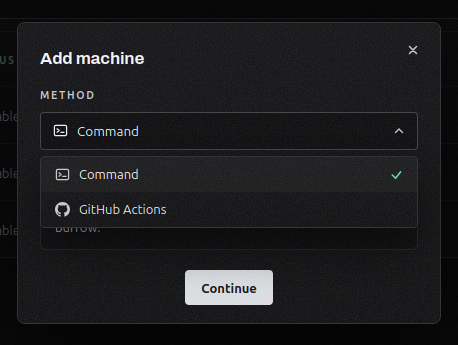
Authenticate a machine with OIDC. When you add a machine, you can now choose OIDC. A CI workflow proves its identity to its provider, which issues a short-lived token for each run that your burrow verifies on every request. GitHub Actions is supported today.
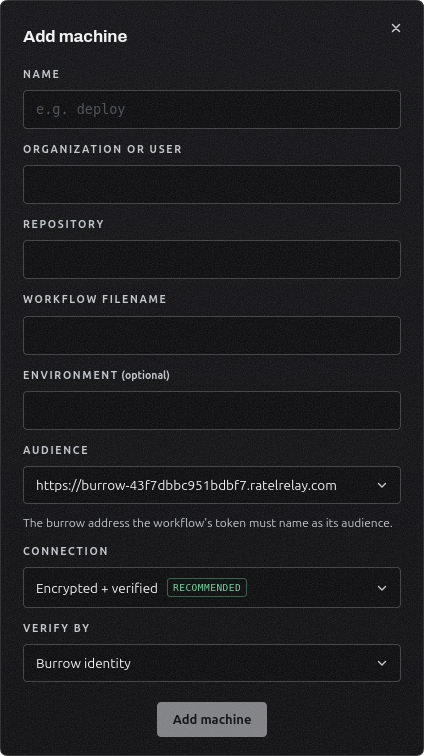
Bound to your burrow's address. The token is pinned to an audience, one of your burrow's addresses that you pick when you add the machine, so a token minted for anything else is refused.
Scoped to the source you name. You tell the burrow which repository and workflow may authenticate, and only a token from that source is accepted. The machine appears on your Machines page and takes project grants like any other, granted the environments it may read on the Projects page.
Machine connection security#
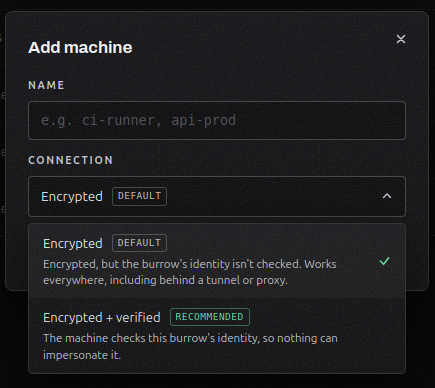
Choose how a machine trusts your burrow. When you add a machine, pick the connection: Encrypted, which works at any address, or Encrypted and verified against your burrow's own key or a certificate authority. Encrypted is the default and works wherever the burrow lives.
Enroll machines in any deployment. A machine now connects cleanly whether your burrow is reached directly on its address, on a custom domain, or behind a reverse proxy or tunnel. You tell the burrow how it is fronted, so it never has to guess.
The same choice for OIDC machines. Adding a machine that authenticates over OIDC offers the same connection choice, and the setup command it hands you matches what you picked.
Every command shows the address it uses. The add-machine screen labels each enrollment command with the address it connects to, and whether that address is reachable from anywhere or only on your network, so you give the right one to each machine.
Audit and access#
Real client IPs behind a tunnel. When your burrow runs behind a tunnel, machine actions record the visitor's real IP in the audit trail and match it against the machine IP allowlist, instead of showing a local address.
Learn more in the docs.