

The CLI is at 1.5.1, the Node.js, Python and Kotlin SDKs at 1.2.0, and the .NET SDK at 1.1.0. Live secrets, ending a machine on shutdown, and the instant restart for ratel run --watch need Burrow 5.1.3.
Interactive CLI#
Sign in as yourself. ratel login https://burrow.example.com signs you in through your browser, and the sign-in shows on the Burrow's Sessions page as the CLI with your computer's name. You can be signed in to several Burrows at once, and ratel login list shows them.
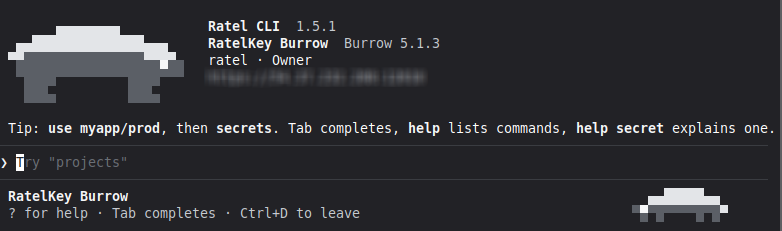
Manage your Burrow from the terminal. ratel interactive opens a session on your Burrow where you can do everything your role allows: projects and environments, secrets and their history, share links, machine access, machines and machine tokens, the IP allowlist, members, roles and sessions, the audit log, webhooks and notes.
Move around like a shell. use myapp/prod moves into an environment, and commands act there until you move again. Tab completes commands, projects, environments and secret names, the up arrow brings back earlier commands, and help explains each one.
Careful with values. You type new values at a hidden prompt or take them from a file. secret copy puts a value on the clipboard without showing it and clears it after 30 seconds. Deleting asks you to confirm, and a change that needs you to confirm it's you opens your browser to do it.
From a script. ratel -p "secrets myapp/prod" runs one command as you and exits, with values read from standard input, --json output, and an exit status that tells success, refusal, wrong use and signed out apart.
Run commands with your secrets#
One read, every secret. ratel run --env myapp/prod -- node server.js starts your command with every secret in an environment as environment variables. A structured secret sets one variable per field, like DATABASE_HOST. Canaries are never included.
Restart on changes. Add --watch and the command restarts when a secret changes. With Burrow 5.1.3 it restarts the moment a change is saved, including a change saved while the command is starting up.
Or read them from a file. --mount <path> gives the command its secrets in a file it reads, in dotenv or JSON form, with nothing left on disk on Linux and macOS.
Clearer connection errors. When the CLI can't reach your Burrow, it says why: nothing is listening on the port, the name doesn't resolve, there's no route, or the Burrow didn't answer in time.
Live secrets#
Secrets that stay current. live("payments/prod/DATABASE") gives you a secret that follows every change on your Burrow as it's saved. Read its value whenever you need it, and listen for changes to act on them, like reconnecting a database pool.
Whole environments too. liveEnvironment("payments/prod") keeps every secret in an environment current, and tells you which secrets changed, were added or were removed.
One connection that looks after itself. All live secrets in an app share one connection to your Burrow. It reconnects on its own and picks up anything that changed while it was down. Each live secret tells you whether it's live, reconnecting, revoked or removed, and keeps its last value if access ends.
In-memory identities#
Nothing on disk. Burrow.enroll(code) enrolls your app with a machine token's code and keeps the key in memory, which suits containers and other hosts with no writable state. The code carries your Burrow's address and how to trust it.
From the environment. With no identity on the host, Burrow() enrolls from BURROW_ENROLL_CODE.
Renewed for you, ended when you're done. Before the machine expires, the SDK enrolls a fresh one with the same code. When your app closes the client, its machine ends on your Burrow straight away.
Fixes#
The Kotlin SDK reports an error from your Burrow that carries no message as the right error, such as not found.
Learn more on the Interactive CLI and CLI pages, and the Node.js, Python, Kotlin and .NET SDK pages.