
The Security section under Settings controls how machines and nodes get into your Burrow and where they can reach it from: how long a machine invitation or node token stays valid, whether a new machine or node waits for your approval, and which addresses machines may read secrets from. Changing anything here needs permission for the Burrow's security settings.
Machine & node invitation expiry#
A machine invitation is the one-time command you run to enroll a server or application, covered on the Machines page. This setting decides how long that invitation stays valid before it expires on its own. Enter a number, choose Minutes or Hours, and select Save. Anything from 1 minute to 30 days is allowed.
Node tokens, which register a node with your Burrow, expire the same way.
A short window suits an invitation you create and use straight away. A longer one suits handing setup to someone who will get to it later. The value applies to invitations created from then on; ones already outstanding keep the expiry they were given.
Require machine & node approval#
With this off, a machine is active the moment it runs its invitation, since creating the invitation was the go-ahead. Turn it on and each new machine arrives marked Pending and reads nothing until you approve it from its row on the Machines page.
A new node is held the same way: it arrives marked Pending on the Nodes page and does nothing on its host until you approve it from its row.
It is worth turning on when the person who creates invitations and the person who runs them are not the same.
Machine IP allowlist#
This restricts which network addresses your machines can read secrets from. With it on, a machine's request is honoured only when it comes from an address you have listed, and a request from anywhere else is turned away. While it is off, machines can read from any address, which is how a new Burrow starts.
Turn it on and the list of allowed addresses and the box for adding them appear below the switch.
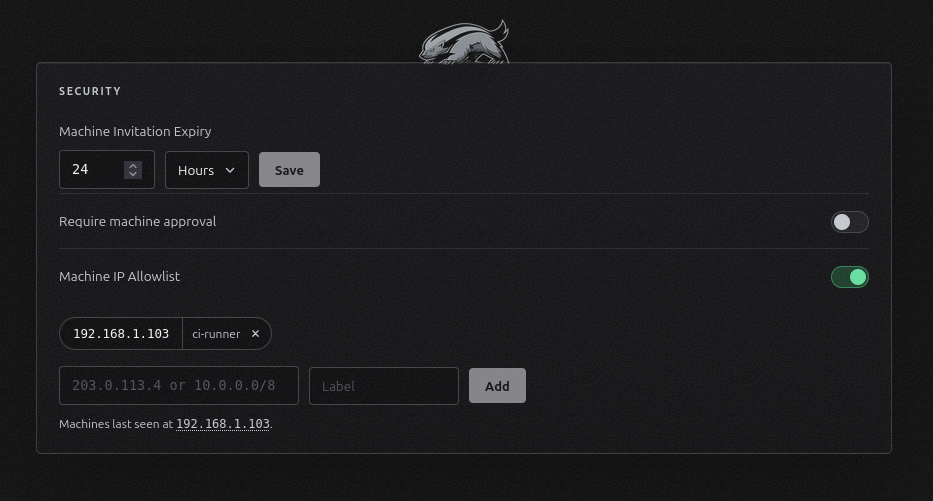
Each entry is a single address such as 203.0.113.4, or a range in CIDR form such as 10.0.0.0/8, with an optional label to keep the list readable. A range is stored in its canonical form, so 10.1.2.3/8 is saved and matched as 10.0.0.0/8, and the list always shows exactly what it matches. Remove an entry with the cross on its chip.
Machines last seen at, under the box, lists the addresses your machines last connected from. Select one to fill the box with it. Because the Burrow already knows where its machines call from, this is the accurate way to fill the list.
Every machine request is checked against the list as it arrives, and adding or removing an address applies on the machine's next call, with nothing to restart. Removing the last address does not switch the feature off: the list stays on and empty, refusing every machine until you add an address. To stop enforcing, switch Machine IP Allowlist off, and the addresses you added are kept and apply again when you turn it back on.
A refused machine gets back a message naming the address its request came from, and the refusal is recorded in the audit log with that address. A machine that was working and suddenly cannot connect is usually one whose outbound address has moved, such as a new NAT or egress IP, and the recorded address is the new one to add.