
A machine token enrolls machines into your Burrow automatically, without setting each one up by hand. A machine invitation registers one machine you name and set up yourself; a token instead carries a policy, and any number of machines can enroll through it while it lasts. Each one that enrolls gets its own identity, the access the token grants, and a fixed lifetime. That is what a fleet that scales on its own, such as CI runners or short-lived containers, needs. You will find it on the Machine tokens page.
A machine enrolled through a token is an ordinary machine afterward: it appears on the Machines page and reads secrets the same way. For creating and running the enrollment command, granting a single named machine access, and disabling or revoking one, see the Machines page.
The two lifetimes#
A token has two clocks, set separately, and keeping them apart is the main thing to understand.
Clock | What it controls |
|---|---|
Token expiry | When the token stops accepting new enrollments. From 5 minutes to 90 days. |
Machine lifetime | How long each enrolled machine lives, counted from its own enrollment. After it, the machine can no longer read. From 1 minute to 90 days. |
They are independent. A token can keep enrolling for a week while each machine it enrolls lives only a few hours.
Create a token#
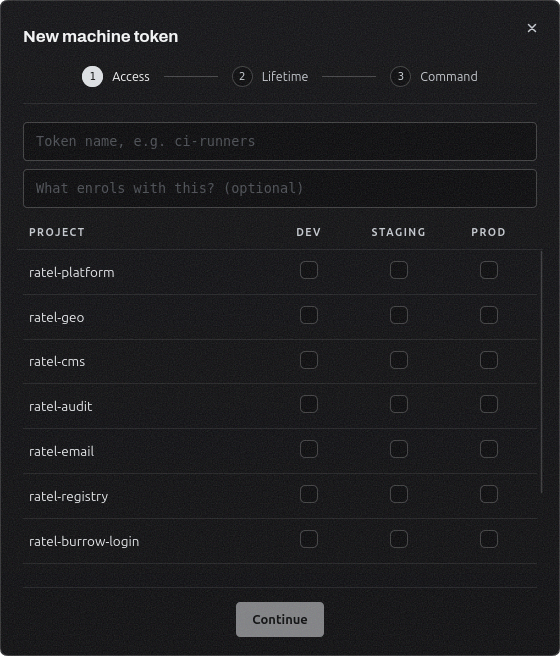
Use New token on the Machine tokens page. The dialog has three steps: Access, Lifetime, and Command.
Access#
Name the token and, optionally, describe what enrolls with it. Then tick the environment categories each project grants: Development, Staging, or Production. A grant covers every environment in that category, exactly like granting a single machine access from a project. A token must grant at least one project and can cover up to 50. Granting a token project access needs secret write permission, since a machine that enrolls through it can then read those secrets.
Lifetime and restrictions#
Set the token expiry and the machine lifetime, each as an amount and a unit. Restrictions below them are optional:
Restriction | Effect |
|---|---|
Enroll only from | A single address or a CIDR block such as 10.0.0.0/8. Enrollment from any other address is refused. |
Hostname must match | A regular expression the enrolling machine's reported hostname has to match, for example ^ci-runner-[0-9]+$. |
Name machines | A naming template for the machines this token enrolls. Leave it blank and they are named eph- plus a short random tag; write eph-{uuid7} and {uuid7} becomes a 7-character tag. It names machines, it does not gate them. |
Machines from a token are named by the template rather than by their hostname, because a fleet built from one image reports the same hostname, and identical names make the audit trail hard to read.
This step also picks the URL every machine enrolled through the token reaches your Burrow at. The list is the one an invitation offers: your Burrow's own addresses, the custom domains saved before, and Custom domain for an address of your own, such as a tunnel in front of your Burrow.
It also sets the Connection every machine enrolled through the token uses to reach your Burrow. Encrypted is not identity-checked and works behind a tunnel or proxy; Encrypted + verified checks the Burrow's identity. For a self-signed Burrow at a URL with a name, verified adds a Verify by choice between the Burrow's own certificate and system trust, for a proxy or CDN in front. It is baked into the enrollment command, so every machine the token enrolls connects the same way.
Command#
The last step shows the enrollment command, the same one an invitation gives, and it reaches your Burrow at the URL you picked. The machine needs Node, which supplies npx.
npx @ratelkey/cli machine bootstrap <code>Run it on every machine that should enroll. You can show the command again later from the token's row menu, for the same URL.
Enrolling a machine#
When the command runs, the CLI generates a key pair on that machine and sends the public half with the token. The Burrow checks the token is still valid and that the machine meets any source and hostname restrictions, then creates a machine with its own identity and key, the token's grants copied onto it, a name from the template, and the token's machine lifetime.
The machine is active at once. A token is your decision in advance about what may enroll, so a token enrollment does not wait for approval even when Require machine & node approval is turned on. The new machines appear on the Machines page and count in the token's Machines column while they are alive. An enrollment that a restriction refuses is recorded in the audit log with the reason, which is where to look when a machine will not come up.
The token list#
Each token shows its name and description, its status, the number of live machines enrolled through it, the machine lifetime, when it expires, and when it was created. Search narrows the list by name or description, and Show revoked brings revoked tokens back into view. A token's status is one of:
Status | Meaning |
|---|---|
Active | Still accepting enrollments. |
Expired | Past its expiry and no longer enrolling. |
Revoked | Turned off by hand. |
A row's menu has Details, which lists everything the token was set up with, including its access, the connection its machines use, how its machines are named, and its restrictions, and stays available for expired and revoked tokens so you can still see what one handed out. Copy command and Revoke appear only while a token is active.
Revoking a token#
Revoke from the row menu. The token stops enrolling immediately. Machines it already enrolled keep running until their own lifetime runs out; to cut them off now, revoke them on the Machines page.
Expiry and cleanup#
When a token passes its expiry it moves to Expired and stops enrolling. Each machine reaches the end of its lifetime on its own clock and can no longer read after that. Expired machines stay on the Machines page for about a month so you can still see what they were and what they read, then are removed. Enrollments, refusals, and expiries are all recorded in the audit log.