CI runners and autoscaled servers start with nobody there to set them up. A machine token is the decision you make once instead: what its machines may read, how long each one lives, and which ones may enroll at all. Every machine that runs the token's command enrolls on its own, with its own identity and key.
What you need#
A Burrow your machines can reach, and a role that can add machines and write secrets in the projects the token grants.
A project with the secrets the machines need. This guide uses
api.Node on the machines that enroll, which supplies
npx.
Name the token and choose what it reads#
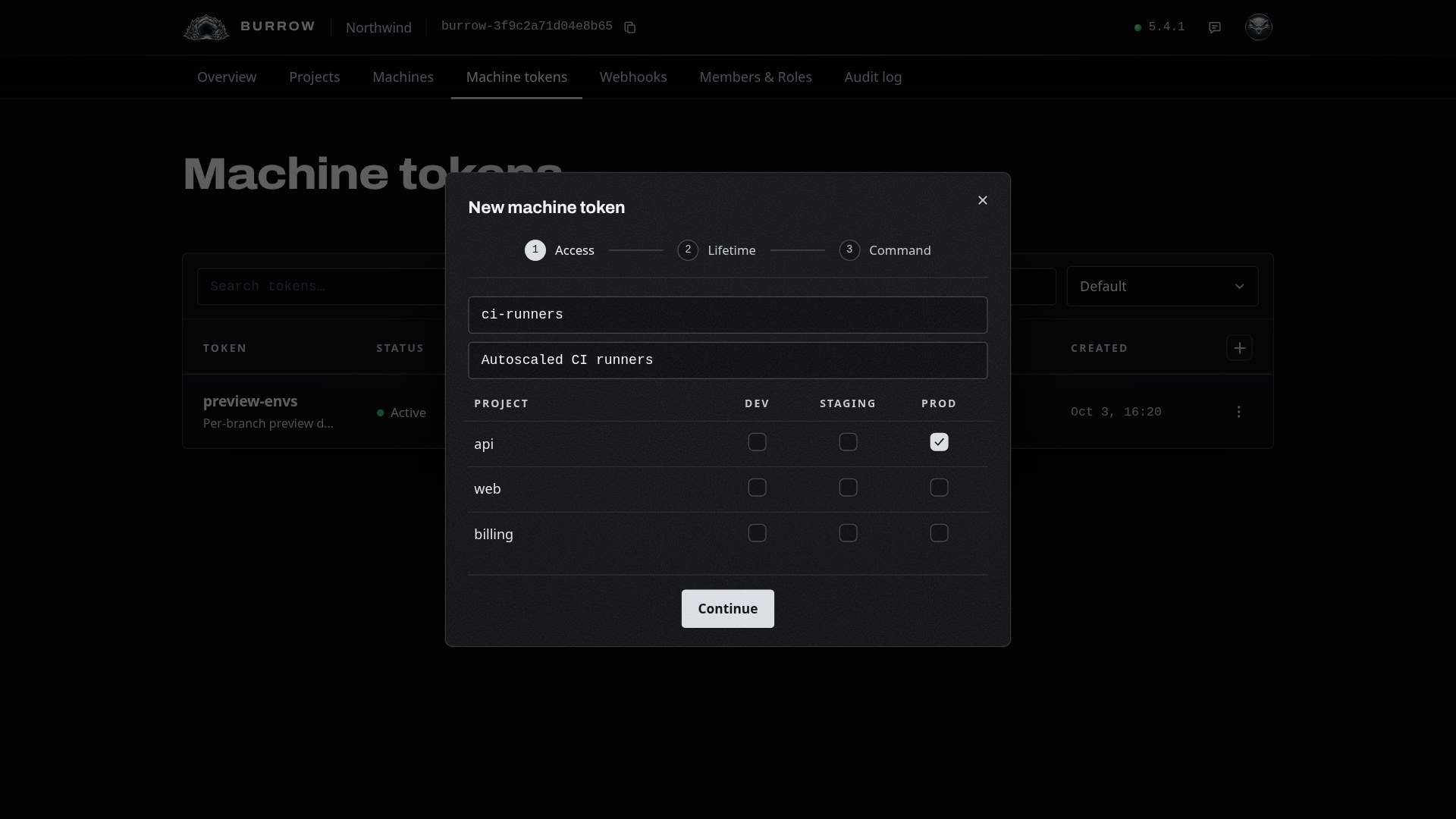
Open Machine tokens in your Burrow and select the + at the top right of the table. Give the token a name, like ci-runners, and, if you like, a line saying what enrolls with it.
Then tick the environment groups each project grants: DEV, STAGING or PROD. A group covers every environment in it, and a token grants between 1 and 50 projects. Select Continue.
Set the two lifetimes#
A token runs on two separate clocks:
Token expiry: how long new machines can enroll, from 5 minutes to 90 days. After it, the token stops enrolling.
Machine lifetime: how long each machine reads, counted from its own enrollment, from 1 minute to 90 days. After it, the machine can no longer read.
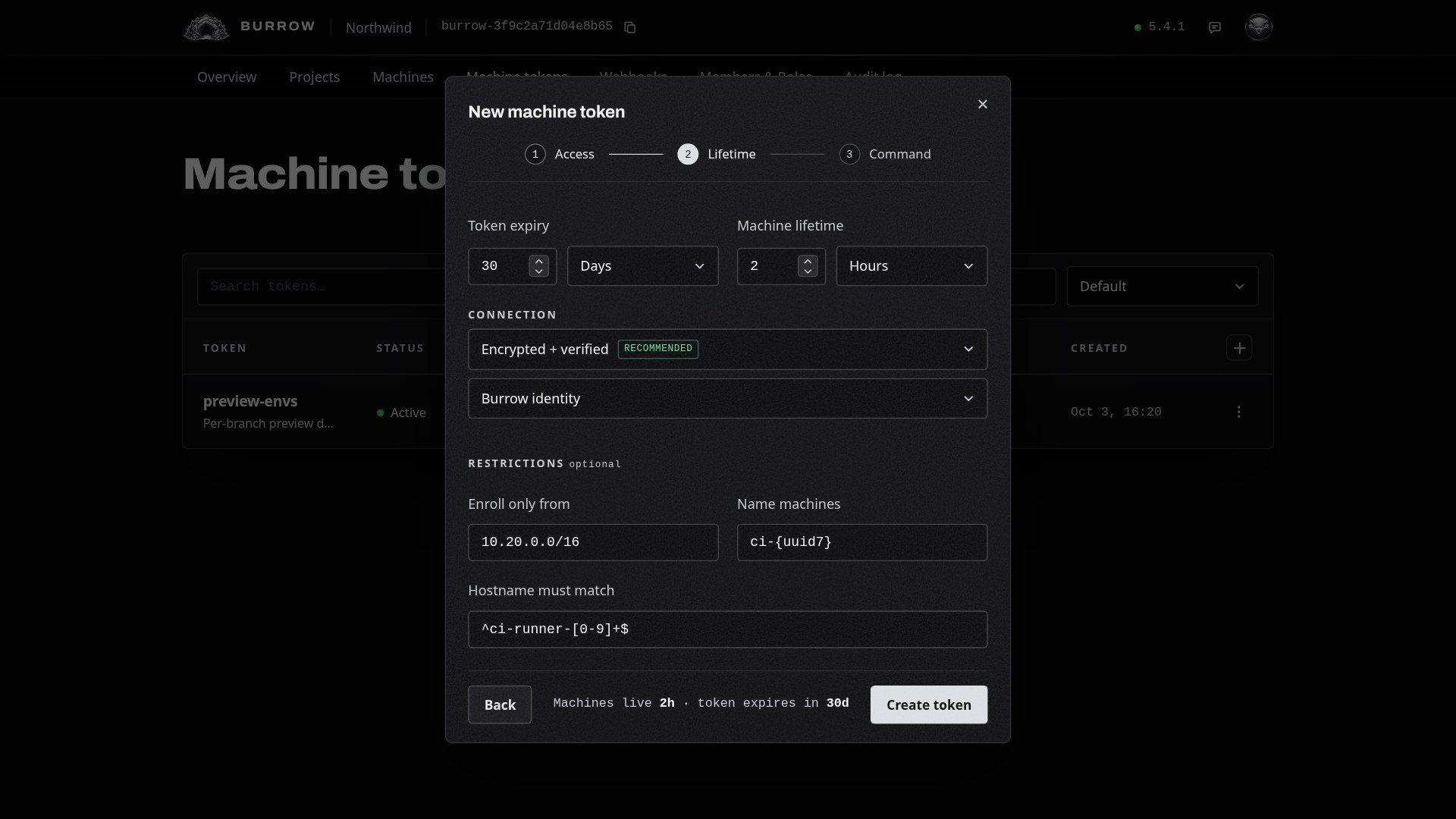
They don't depend on each other. This guide sets a token that enrolls for 30 days and machines that live 2 hours each, so a runner that enrolls on the token's last day still gets its full 2 hours. The line at the bottom of the dialog sums it up: Machines live 2h · token expires in 30d.
Choose how machines connect#
Under Connection, choose how every machine the token enrolls reaches your Burrow. It's baked into the enrollment command, so they all connect the same way.
Encrypted: encrypted, but your Burrow's identity isn't checked. Works everywhere, including behind a tunnel or proxy.
Encrypted + verified: machines check your Burrow's identity, so nothing can impersonate it. This is the recommended choice.
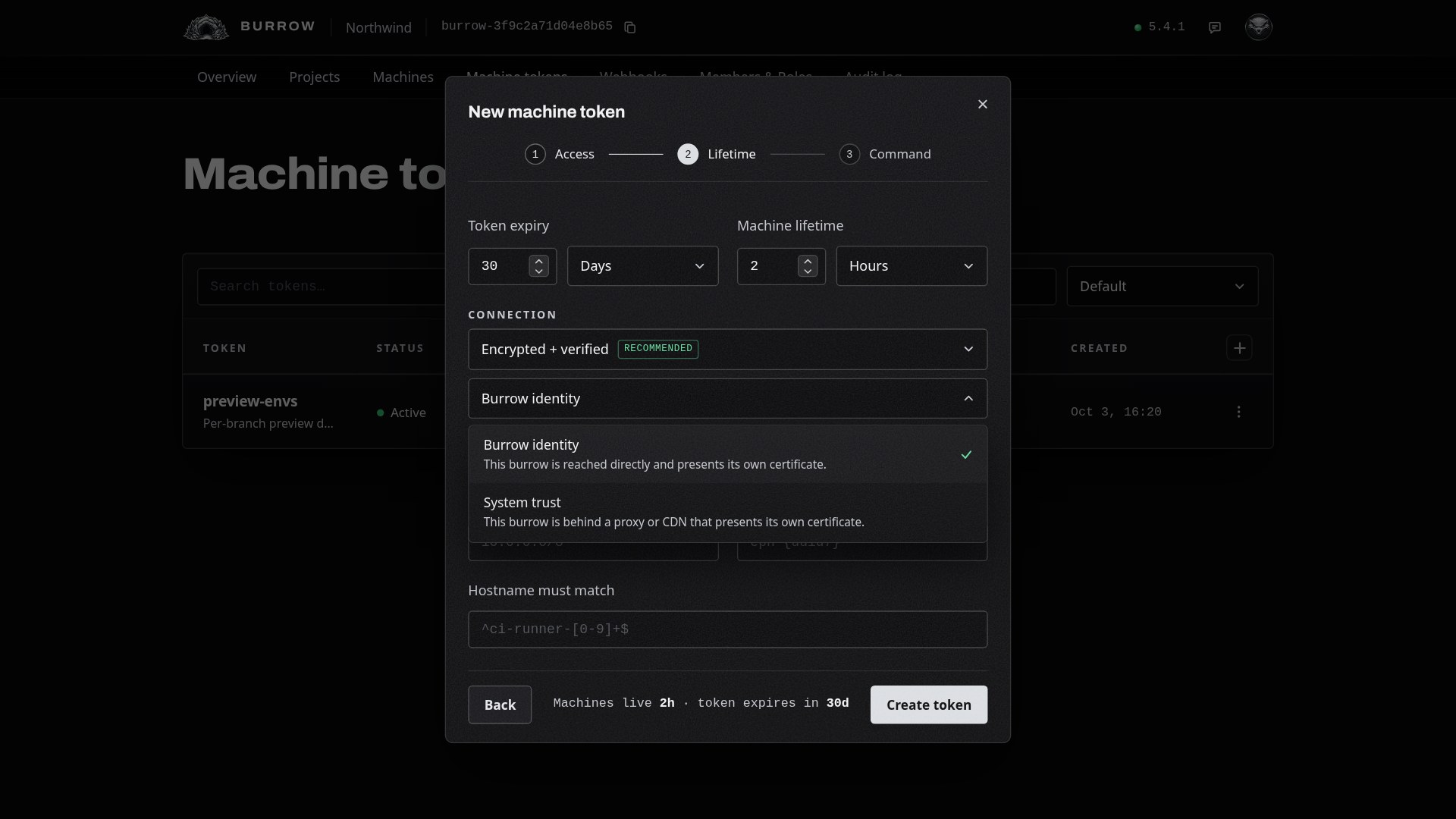
On a Burrow with a self-signed certificate, verified asks one more thing, Verify by:
Burrow identity: your machines reach the Burrow directly, and they check its own certificate.
System trust: your Burrow sits behind a proxy or CDN that presents its own certificate, and machines check it against the certificates their system trusts.
Add restrictions#
Under Restrictions, three optional fields narrow which machines enroll and decide what they're called:
Enroll only from: a single address or a range such as
10.20.0.0/16. An enrollment from any other address is refused. It's the address your Burrow sees the enrollment come from.Name machines: a template for the machines' names.
ci-{uuid7}names themci-plus 7 random letters and digits, likeci-4k2m9xq;{uuid}alone gives 8, and any length from 4 to 32 works. Left blank, machines are namedeph-plus 7. A fleet built from one image reports one hostname, which is why names come from the template.Hostname must match: a regular expression the machine's hostname has to match. Anchor it with
^and$to match the whole name:^ci-runner-[0-9]+$letsci-runner-12enroll and refuses anything else.
Select Create token.
Run the enrollment command#
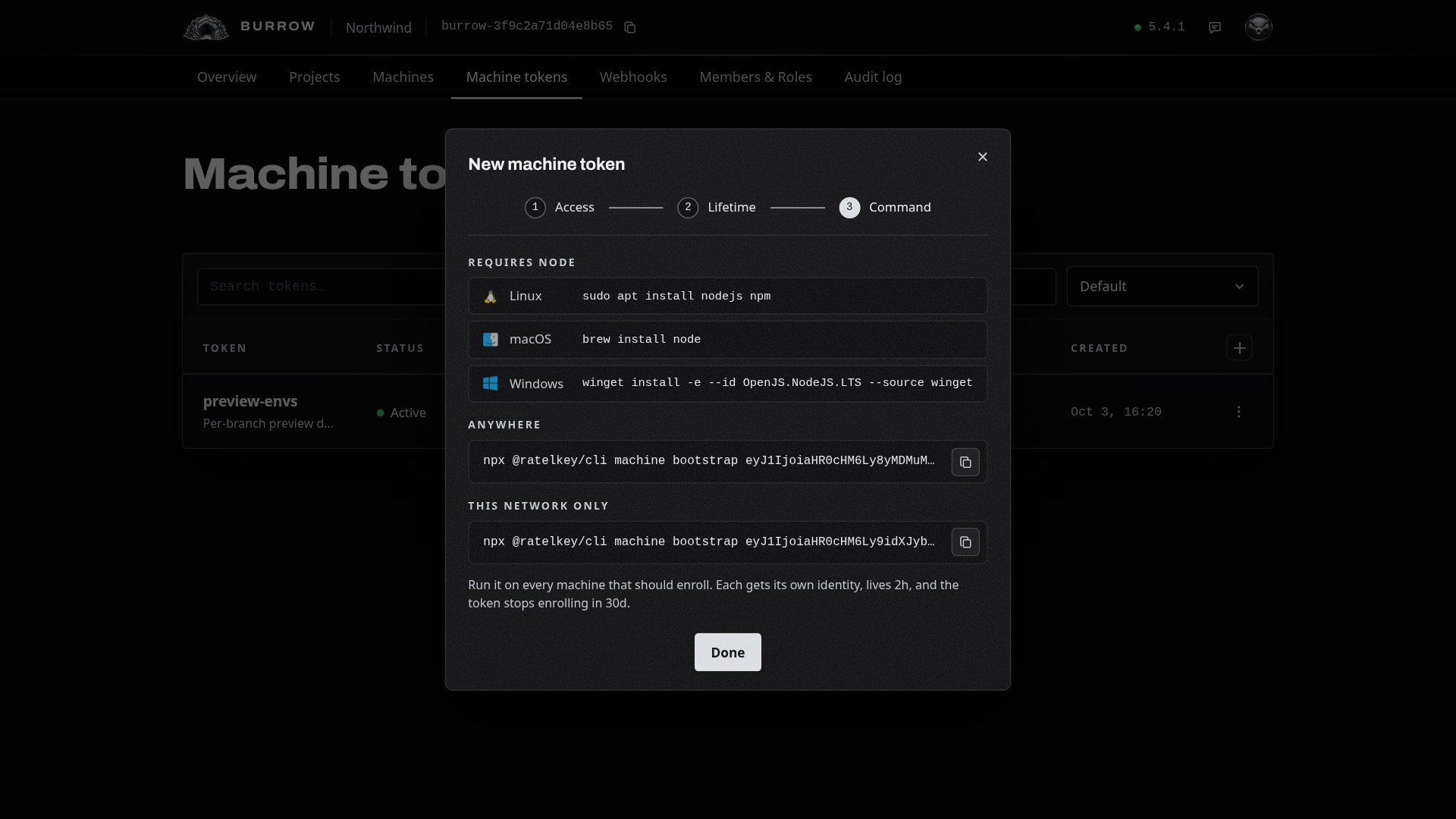
The last step shows how to install Node on Linux, macOS and Windows, and the enrollment command. Where your Burrow is reachable from outside its own network there are two: Anywhere for machines elsewhere, and This network only for machines on the same network as your Burrow. Copy the one that matches where your machines run:
npx @ratelkey/cli machine bootstrap <code>Run it as each machine starts, for example in your runner image's start-up script. The machine makes its own key pair, sends the public half with the token, and enrolls under the template's name with the token's grants.
Watch machines enroll#
Select Done. The token is in the list, and its Machines column counts the live machines enrolled through it. Each machine is ready to read at once and shows on the Machines page, with no approval to wait for, even when Require machine approval is on.
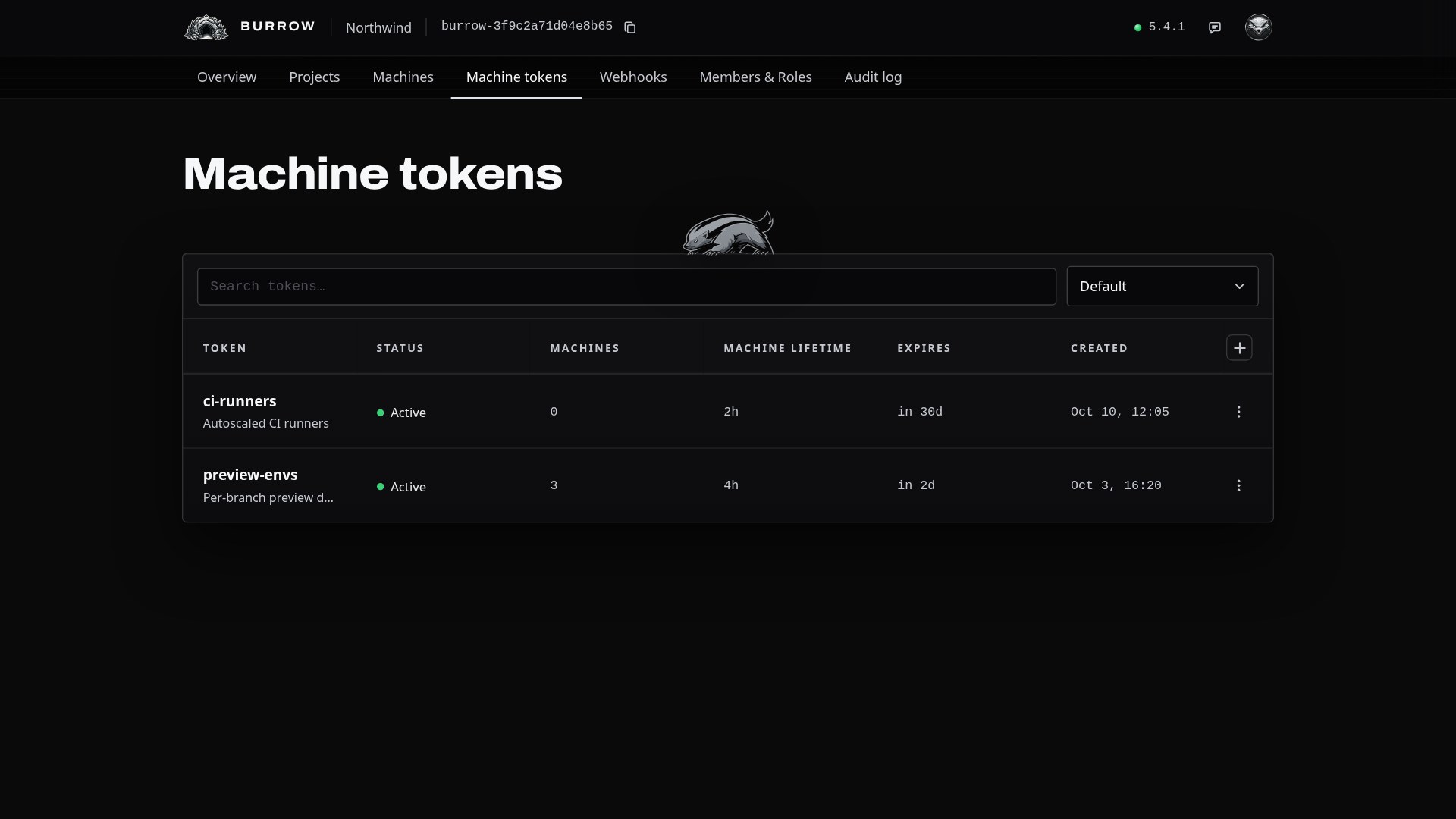
The row menu has Details, with everything the token was set up with, and Revoke. Revoking stops the token enrolling at once; machines it already enrolled keep running until their own lifetime ends, and you can revoke them on the Machines page to cut them off now.
If a machine doesn't enroll#
The command prints why, after the burrow refused the enrollment:
Enrollment refused: source address … is outside …
The machine enrolled from an address outside Enroll only from. Check the address your Burrow sees, which can differ from the machine's own behind NAT or a proxy, and widen the range if it's one of yours.
Enrollment refused: hostname '…' does not match the token's pattern
The machine's hostname doesn't match Hostname must match. The hostname is the machine's own, or the name passed with --name. Check the expression against the exact name the error shows.
Invalid or expired token.
The token has passed its expiry or was revoked. Its status shows in the Machine tokens list; create a new token for machines that still need to enroll.
Enrollment refused: this token's projects no longer exist.
Every project the token granted has been deleted, so a machine would have nothing to read. Create a token for the projects you have now.
Every option in one place: Machine tokens in the documentation.