
A machine reaches nothing until you give it access. Access is granted from the project rather than from the machine, and it covers an environment category across every environment in it. This works the same for every machine, whether it enrolled with a command or as a GitHub Actions workflow.
Grant access#
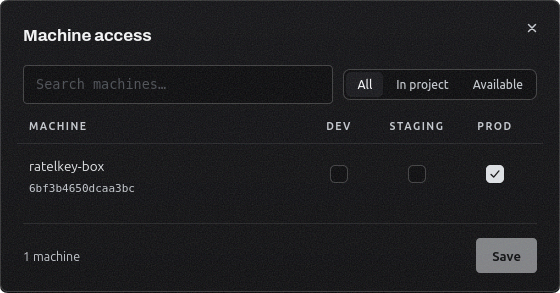
Open Projects and use a project's row menu.
Select Manage machines.
Tick Development, Staging, or Production on the machine's row, then save.
A grant covers every environment in that category, so a machine can hold production access without staging, or the reverse. Each category panel in the project shows how many machines currently reach it, and the Projects table shows the total per project.
Grants apply on the machine's next request. Adding or removing one takes effect immediately, with nothing to restart on the machine's side.
Disable or revoke#
The row menu on the Machines page carries Rename, Audit logs, Disable, and Revoke.
Action | What happens | Getting back |
|---|---|---|
Disable | The machine stops reading. Its identity and grants stay as they are. | Enable from the same menu. |
Revoke | The machine is removed. Anything running as it loses access on its next request. | Add the machine again. |
Disable is the one to reach for while a server is being rebuilt, or to find out what still depends on a machine before you remove it.
Seeing what a machine does#
The Machines table shows each machine's status, its key fingerprint or, for a GitHub Actions machine, its repository, and when it was last seen. The search box and filter above it narrow the page down when the list gets long.
Audit logs in the row menu opens that one machine's trail: every secret it read and every change made to it, with the source address and whether the read came through the CLI, an SDK, or plain HTTP. You can filter it by severity and by event type.