A project is one application or service, and everything its code needs to run lives inside it. A project holds environments grouped by stage — Development, Staging, and Production — and each environment holds the secrets for that stage. This page covers projects, their environments, and giving machines access to them; the secrets themselves are covered separately.
How it is organized#
Level | What it is |
|---|---|
Project | One application or service. Comes with a Development, Staging, and Production stage. |
Environment | One set of secrets under a stage, with its own address an app reads from. Each stage has one to start and can hold more. |
Secret | A named value that lives in an environment. Covered on its own page. |
Projects#
On the Projects page, add a project with the
+at the top right of the table.Name it after the application or service it holds the secrets for.
Create it. It arrives with an empty Development, Staging, and Production environment, ready for secrets.
The table lists each project with how many environments and machines it has. Drag a row by its handle to reorder the list. A project's row menu holds Manage machines, Rename, and Delete. Select a project's row to open it.
Environments#
Inside a project, environments are grouped under the three stages: Development, Staging, and Production. Each stage starts with one environment and can hold more — useful when a stage needs a per-service or per-branch split.
Add another environment to a stage with the + at the top right of that stage. Its name is prefixed with the stage, so adding github under Development becomes dev-github. Each environment's row menu can copy the address an application reads its secrets from, and rename or delete it.
Machine access#
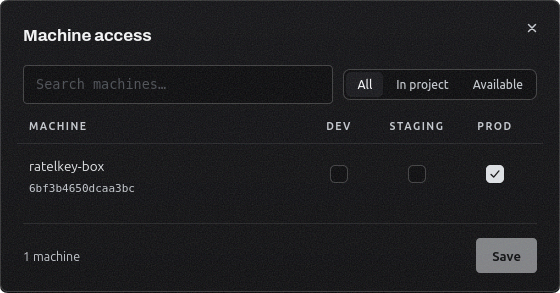
A machine reaches a project's secrets by being granted a stage of it. Open a project's row menu and choose Manage machines to tick which of Development, Staging, and Production each machine may read.
Access is by stage, not by individual environment: a machine granted Production reads every Production environment in the project, including any you add later. Each stage in the project shows how many machines currently reach it, and the projects table shows the total per project. Enrolling a machine in the first place, and the grant screen itself, are covered on the Machines page.