
A webhook sends events from your Burrow's audit log to somewhere else the moment they happen: a Slack or Discord channel, or an endpoint you run. Use one to hear about a deleted secret, a new member, or a machine reading a canary without watching the audit log.
Integrations#
Integration | What it delivers |
|---|---|
Signed | A JSON payload to any http or https URL you control, signed with a secret so your endpoint can check it came from your Burrow. |
Discord | A message in a Discord channel, coloured by severity, with the actor, target, and source address. |
Slack | A message in a Slack channel, with the same details. |
Discord and Slack can't check a signature, so their webhooks have no signing secret. Their webhook URL is what lets anyone post to the channel, so keep it private.
Adding a webhook#
Select Webhooks in the navigation, then + at the top of the list.
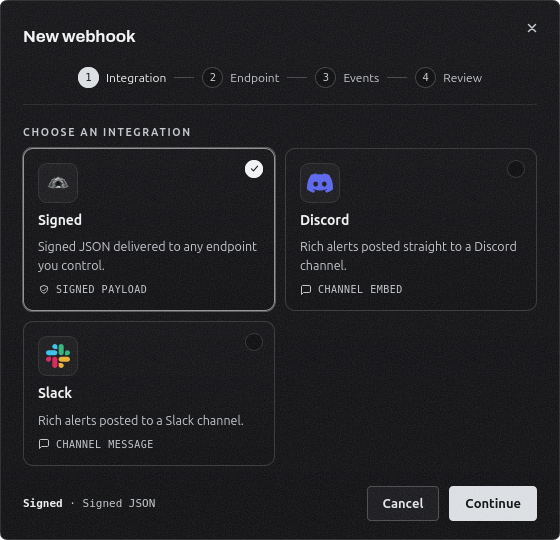
Choose Signed, Discord, or Slack.
Name the webhook and enter the URL. For Discord, copy the webhook URL from the channel's Integrations settings. For Slack, copy the incoming webhook URL from your Slack app, which starts with https://hooks.slack.com/services/.
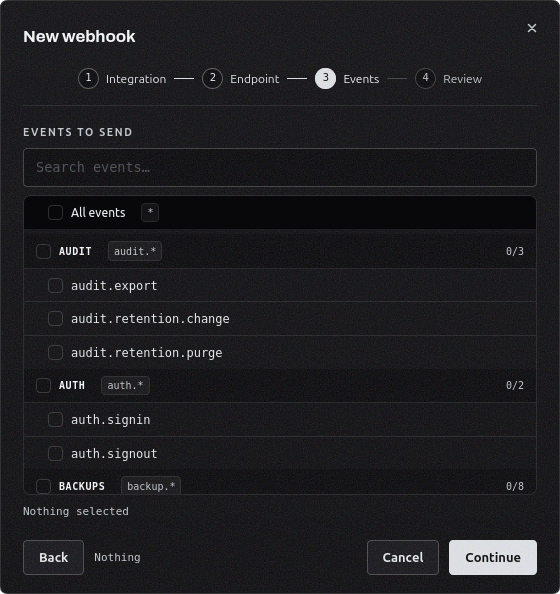
Choose the events to send. See Choosing events below.
Check the summary and select Create webhook.
A Signed webhook shows its signing secret once it is created. Copy it into your endpoint's configuration. You can see it again later from the Secret column.
A new webhook receives events from the moment it is created. Earlier events in the audit log are not sent.
Choosing events#
Events are grouped by what they concern, such as Secrets, Machines, or Members, and named by their code, such as secret.delete. You can select:
All events, which also covers events added in later versions of the Burrow.
A whole group, such as secret.*, which also covers events later added to that group.
Individual events.
Every event the Burrow can record is listed, including ones that haven't happened yet, so you can set up a webhook for an event before it first occurs. Use the search box to find one by code.
The Webhooks page#
Column | Shows |
|---|---|
Secret | For a Signed webhook, the hidden signing secret with an eye button to reveal it. A red cross means the integration has no secret. |
Events | How many selections it has: events, groups, or all. |
Status | Healthy, Failing, or Disabled. Hover over Failing to see the last error. |
Last delivery | When an event last reached the endpoint. |
Each webhook's row menu has:
Send test, which delivers a webhook.test event straight away and shows the response. It works on a disabled webhook too.
Edit, to change the URL or the events. The integration and name are fixed once it is created.
Disable or Enable. A disabled webhook sends nothing, and events that happen while it is disabled are not sent later.
Delete, which stops deliveries immediately and removes its signing secret for good.
The signed payload#
A Signed webhook POSTs one JSON object per event:
{
  "id": "3f6c1a2e-7d4b-4c1e-9b8a-2f5d7e9c0a11_4821",
  "event": "secret.delete",
  "severity": "warning",
  "timestamp": 1790518932561,
  "source": "Home Burrow",
  "data": {
    "actor": { "type": "user", "name": "alice", "id": "a1b2c3d4-..." },
    "target": { "type": "secret", "id": null, "name": "payments/prod/STRIPE_KEY" },
    "summary": "alice deleted secret 'STRIPE_KEY' from 'payments/prod'",
    "detail": null,
    "sourceIp": "203.0.113.42",
    "fields": {}
  }
}
Field | Meaning |
|---|---|
id | Unique to this event and this webhook. A retry of the same event carries the same id. |
event | The event code, the same one the audit log uses. |
severity | info, notice, warning, high, or critical. |
timestamp | When the event happened, in milliseconds since the Unix epoch. A delivery that was retried still carries the original time. |
source | Your Burrow's name. |
data | Who acted and their kind (user, machine, or system), what they acted on, the same sentence the audit log shows, and the address the request came from. Any of these can be null. |
Each request also carries these headers:
Header | Value |
|---|---|
X-Burrow-Signature | The HMAC-SHA256 of the request body under your signing secret, as lowercase hex. |
X-Burrow-Event | The event code. |
X-Burrow-Delivery-Id | The same value as id in the body. |
User-Agent | Burrow-Webhook/1.0 |
Verifying the signature#
Compute the HMAC-SHA256 of the raw request body, exactly as received and before parsing it, using your signing secret as the key. Compare it to X-Burrow-Signature with a constant-time comparison, and reject the request if they differ. For example, in Node.js:
import { createHmac, timingSafeEqual } from "node:crypto";

function isFromBurrow(rawBody, signatureHeader, secret) {
  const expected = createHmac("sha256", secret).update(rawBody).digest("hex");
  const a = Buffer.from(expected);
  const b = Buffer.from(signatureHeader ?? "");
  return a.length === b.length && timingSafeEqual(a, b);
}
The signature covers the body only. To ignore a delivery you have already processed, keep the X-Burrow-Delivery-Id values you have seen.
Delivery and retries#
Events are queued on the Burrow and sent within a few seconds of happening. The queue survives a restart, so nothing is lost if the Burrow restarts while deliveries are waiting.
Any 2xx response counts as delivered. The endpoint has 10 seconds to accept the connection and 20 seconds to respond.
Response | What happens |
|---|---|
5xx, 429, a timeout, or no connection | Tried again after 1 minute, 5 minutes, 15 minutes, 1 hour, and 4 hours. After six attempts in total, the event is dropped. |
Any other 4xx | Dropped straight away, since sending it again would get the same answer. |
A redirect (3xx) | Dropped. Redirects are never followed, so point the webhook at the final URL. |
A dropped event marks the webhook Failing until a later event gets through. After 15 dropped events in a row, the webhook is disabled so a dead endpoint stops receiving attempts. Fix the endpoint, then select Enable from the row menu to start again with a clean record.
Who can manage webhooks#
Viewing webhooks needs permission to read them. Adding, editing, testing, enabling, disabling, and revealing a signing secret need permission to write them, and deleting needs permission to delete them. Of the built-in roles, only Administrator has these, since a webhook carries audit events out of the Burrow.
Adding, editing, deleting, and testing a webhook, and revealing its signing secret, are all recorded in the audit log.